Phone: 888-477-6463
Support: Mon-Fri 5am-6pm MST

1

Choose a category below to reveal the corresponding IPRO software titles

2

Click the software title for in depth details.

IPRO Premium Scan provides a flexible project setup function, multiple levels of security and access control, workflow tools to automate project management, and multiple quality control modules to analyze and detect issues before they become problems.

Security
Apply permissions at every level; user, group, job, batch, document, page, and application.

Production Support
Extensive support for most scanners and multi-function digital copiers.

Export
Extend your capabilities by creating export load files for 3rd party programs, which include Summation 5.2, Blaze, EDII, Blaze LG, Opticon, Ringtail (Access 97 and 2000), Doculex, DB Textworks, ETech, OLL, Visionary, Documatrix, Introspect, and ASCII formats. Additionally, integrate with other IPRO products, including OCR, Coding, IPRO Build, PDF Creation, IPublish, and IPRO Print modules.

Image Management
Introduce greater flexibility into the scanning process through burning in image keys, messages, and bar codes. Clean up and enhance images interactively while creating images in TIFF, PDF, JPG, BMP, PCX, and PNG formats.

IPRO Copy+ simplifies even the most complex copying tasks. Manage imaging processes from a touch screen interface, allowing you to rapidly copy, image, Bates™ label, and OCR legal documents.

Simultaneously Image, Bates™ label, OCR and Print Legal Documents
Scan and print simultaneously, increasing the efficiency of copy operations. Use prep sheets to feed multiple documents at the same time while preserving the document breaks. Additionally, because documents can be imaged and OCRed at scan time, you are able to utilize advanced search and retrieval capabilities for all copied documents.

Pre-Printing Quality Control
Rotate, renumber, deskew, and despeckle pages prior to printing, reducing costly rework.

Export to CD, DVD, or Disk File
Electronic versions of documents can be stored on a CD, DVD, or disk file for portability and convenience. Using IPublish Viewer, electronic documents can be searched, annotated, and quickly reprinted while preserving all binding element information.

Multiple Output Options
Output paper document collections as searchable and/or bookmarked PDF images, TIFF images, litigation database load files, box index reports, or a complete runtime database system in addition to paper copies.

Reduce costs, minimize risk and increase responsiveness by putting the most widely used litigation support software to work for your department. A 3 in 1 desktop application with eScan-IT you can effectively manage an entire case from ingestion to production and export to virtually all industry-standard formats.

Electronic Discovery
Search electronic files, create images, extract text and metadata, print electronic files and export to popular litigation formats. Features such as file preview, advanced full text searching and filtering effectively help cull the collection down to the needed files. Easily define Bates™ numbers, code fields, extract metadata and file text, and convert electronic files to TIFF or searchable PDF’s. Export to industry- standard formats, including auto-load options for IPRO, Concordance, and Summation.

Scanning Features
eScan-IT supports Twain, ISIS, and Kofax scanners, allowing support for virtually any scanner. Everything needed to image, index, and produce documents is built into eScan-IT, which means no add-on modules or additional costs.

Printing
The Quick Print feature in eScan-IT provides the ability to quickly and easily print electronic files to paper without performing full EDD processing on the collection. Metadata slip sheets may be printed for each file/document from any configurable tray within the selected printer. This allows for color slip sheets containing file metadata, including File Name, Type, Size, Creation Date, Modification Date and Document Number.

IPRO Code-IT is a complete document coding management system for law firms and corporate legal departments. The system manages workflow and document distribution from requirements definition and project setup to unitization, coding, quality control, data validation, and export.

Workload Monitoring
Using the project estimate reports, the administrator can monitor the workload and adjust unitizers, coders, and QC personnel to ensure that deadlines are met.

Flexible Coding Options
Images may be located anywhere on the IPRO Code-IT server’s network, and you can create coding batches from Bates™ ranges, input files, or document types. Coders may type, pick from lists, or screen-scrape text (zonal OCR) from the images. Define up to 100 coding fields of multiple types, and the coding field validation logic is also fully customizable.

Security
Administrators can control which users have access to which projects and which tasks they may perform. Also, an internal mail system eliminates the threat of email virus infection.

IPRO V-Code is a code-from-image system that allows secure document coding over the Internet or a local-area network. The application is a process flow management system that controls the distribution of coding “batches” throughout the indexing process, including logical unitization, coding, QC, and data validation.

Security
Administrators can control which users have access to which projects and which tasks they may perform. Utilizing an internal mail system eliminates the threat of e-mail virus infection.

Flexible Coding Options
Coding is fully customizable with up to 200 fields including automatically populated image keys, document boundary, page count, and folder description. Coding fields may be imported, typed in, picked from lists, or scraped from the screen using zonal OCR. Options at the system, project, and user levels allow the customization of appearance, functionality and behavior.

Scalable
IPRO V-Code allows images to be located on any IPRO iNet server in any location, which lets you easily scale the workforce to the size and complexity of the project. Personnel may safely access the system from home or from the road, giving the ability to add new workers or to outsource as needed.


IPRO iNet is a state-of-the art, 32-bit secure client/server program that allows access to image collections over local-area networks, wide-area networks, and the Internet. Because data is maintained in one location, collaboration is greatly enhanced, increasing the efficiency and quality of document review. Using TCP/IP as the only available connection string, the traffic that occurs in a normal wide-area network is eliminated. This results in improved image access speed and lower network traffic per remote user, allowing time to be used effectively and deadlines to be met.

Encryption
All information sent to and from the image server is encrypted, including both commands and images. The encryption scheme is a proprietary IPRO algorithm.

Scalability
IPRO iNet allows several hundred concurrent users to access a single server for image collection review and can support up to 99 servers, making it a highly scalable solution.

Integration
The iNet application allows access to and manages remote IPRO View users, as well as gives users remote printing capabilities.

A litigation database and more, IPRO Eclipse SE gives you the power to effectively control all aspects of your case through a single Discovery Management application, without the need of a DBA. IPRO Eclipse SE consolidates your data in a common database, ensuring data integrity throughout the litigation process, while also reducing cost of ownership through eliminating the need for multiple technologies.Key components of IPRO Eclipse SE are:

Proprietary Database
No matter what size your organization, IPRO has taken you into consideration and created a product that can utilize the power inherit in IPRO’s proprietary database which needs no DBA for maintenance. The database features multi-language support and is fully Unicode compliant.

Batch Management
Quickly and easily create review passes to manage the full life cycle of your case. Assign batches of documents to reviewers and get real-time feedback on batch review progress through use of EclipseSE dashboard analytics.

Desktop Management
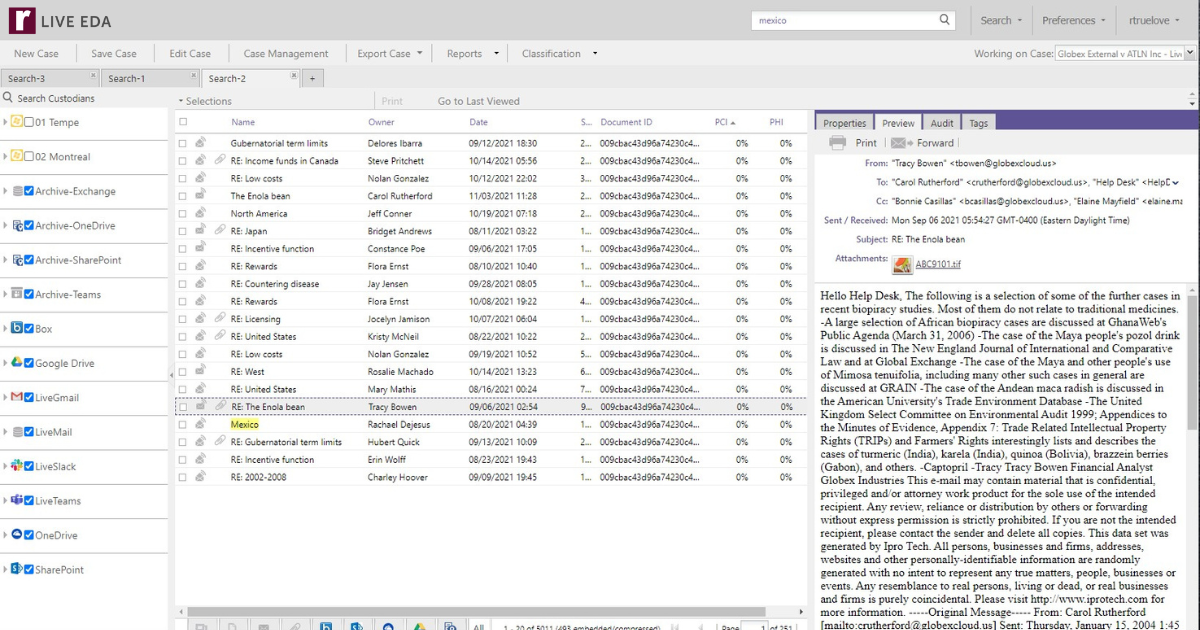
View case documents from a single interface. Create complex search queries to refine dataset results and identify key case information through use of document and page level tags. Further refine case documents through use of EclipseSE’s annotation palette and organize case findings for you and your team by utilizing smart and private folders.

Production
Allow users to produce case documents in TIFF, PDF, Text, HTML, and Native file formats. Customize your production through application of custom messages, watermarks, highlights, markups, bates stamps, redactions, and more.

Dashboard
Monitor and analyze the real-time progress of your case from your desktop. Set performance thresholds so you are always in the know and can make adjustments on the fly if necessary.

A litigation database and more, IPRO Eclipse gives you the power to effectively control all aspects of your case through a single Discovery Management application. Designed with you in mind, IPRO Eclipse consolidates your data in a common database, ensuring data integrity throughout the litigation process, while also reducing cost of ownership through eliminating the need for multiple technologies.Key components of IPRO Eclipse are:

Multiple Database Options
No matter what size your organization, IPRO has taken you into consideration and created a product that can utilize the power inherit in Microsoft SQL Server or IPRO’s proprietary database. Both offer multi-language support that is fully Unicode compliant.

Batch Management
Quickly and easily create review passes to manage the full life cycle of your case. Assign batches of documents to reviewers and get real-time feedback on batch review progress through use of Eclipse’s dashboard analytics.

Desktop Management
View case documents from a single interface. Create complex search queries to refine dataset results and identify key case information through use of document and page level tags. Further refine case documents through use of Eclipse’s annotation palette and organize case findings for you and your team by utilizing smart and private folders.

Production
Allow users to produce case documents in TIFF, PDF, Text, HTML, and Native file formats. Customize your production through application of custom messages, watermarks, highlights, markups, bates stamps, redactions, and more.

Dashboard
Monitor and analyze the real-time progress of your case from your desktop. Set performance thresholds so you are always in the know and can make adjustments on the fly if necessary.


With IPRO View search, retrieve, issue tag, redact, and annotate images while reviewing.

Full Text Searching
If your images processed with IPRO OCR, you have full text searching capabilities shortly after scanning is completed. IPRO View will highlight the word(s) on the image with options to print the search hits on the image.

Access
Access and use the product anywhere, anytime via local, LAN, WAN, or through the Internet using secure TCP/IP.

Document Review
Create user defined tags, apply redactions, make on-the-fly document boundary modifications, and insert searchable sticky notes and embedded text. For increased flexibility, IPRO View features hotkey shortcuts for every feature, one click tagging, and supports all industry standard image formats, including PDF.

Integration
IPRO View seamlessly integrates with many popular 3rd party applications including Concordance and CT Summation databases.


Export document collections to CD, DVD, or external hard drive, providing portability and convenience. Using an integrated runtime viewer and database, the receiving party can then view the collection without loading data into a conventional database. Perform various tasks on the document collection, including viewing document images, searching images for keywords using OCR results, annotating images, reprinting images, and creating issue tags.

Annotation Options

Redact, highlight, or add sticky notes to electronic document collections.

Tree View Navigation

IPRO’s exclusive Tree View makes navigation through image files simple, so users can spend less time retrieving documents and more time reviewing them. Navigate collections by source, box, folder, or Bates™ numbers.

Flexible Input Options

When you create a document collection using IPRO IPublish, you decide which documents to include by an image key range, an ASCII file of beginning and end ranges, an ASCII file of image keys, or a tag/issue collection. By splitting a large document collection into manageable pieces, multiple users can simultaneously review a large project, ensuring project deadlines are met.

Reduce costs, minimize risk and increase responsiveness by putting the most widely used litigation support software to work for your department. A 3 in 1 desktop application with eScan-IT you can effectively manage an entire case from ingestion to production and export to virtually all industry-standard formats.

Electronic Discovery
Search electronic files, create images, extract text and metadata, print electronic files and export to popular litigation formats. Features such as file preview, advanced full text searching and filtering effectively help cull the collection down to the needed files. Easily define Bates™ numbers, code fields, extract metadata and file text, and convert electronic files to TIFF or searchable PDF’s. Export to industry- standard formats, including auto-load options for IPRO, Concordance, and Summation.

Scanning Features
eScan-IT supports Twain, ISIS, and Kofax scanners, allowing support for virtually any scanner. Everything needed to image, index, and produce documents is built into eScan-IT, which means no add-on modules or additional costs.

Printing
The Quick Print feature in eScan-IT provides the ability to quickly and easily print electronic files to paper without performing full EDD processing on the collection. Metadata slip sheets may be printed for each file/document from any configurable tray within the selected printer. This allows for color slip sheets containing file metadata, including File Name, Type, Size, Creation Date, Modification Date and Document Number.

IPRO eCapture is a powerful, innovative e-discovery software designed to handle large projects with speed and scalability. The system is designed around a distributed, multi-threaded, and centralized management concept.

Key components of eCapture are:

Centralized Management
The processing and export of electronic data is designed for control from a centralized console, allowing one individual to control and monitor all processing. Jobs can be created, configured, prioritized or re-prioritized, monitored and controlled from one computer. Utilizing Windows Remote Desktop, one user can control multiple processing environments in one or more data centers from any location.

Scalability
While eCapture uses a centralized management console for job control, the heavy work of electronic file processing is carried out with distributed automated ‘worker’ computers that perform all the functions of identification, indexing, extraction, tiffing and export. These ‘worker’ machines are configured once for the proper SQL server and then automatically receive task assignments to process files. Scaling is achieved by increasing the number of computers, not personnel.

Stability
Each eCapture ‘worker’ application utilizes multiple threads in memory to allow processing multiple files in parallel on each machine. The application monitors every thread and adjusts for any application or problem file issues. Periodically, each worker machine clears all applications and memory to maintain stable and reliable memory and file processing. A centralized service monitors the activity of every ‘worker’ on the system and each ‘worker’ remains in communication with the central service. Any loss of communication is immediately accounted for by the service and all files for that worker are reassigned until the worker machine performs a total reset. This assures that all files are processed and no orphans exist to delay job completion.

Flexibility
eCapture provides flexibility and control over ESI discovery through offering users the ability to perform powerful searching, de-duping, filtering and compound document handling. Users setup processing rules to automate the process and minimize human intervention. eCapture’s export is fully distributed allowing for fast, high volume production of native files, images, searchable PDF files, and load files for major litigation software packages. The export offers a full range of options including endorsements, single or multipage images and/or text files and native file export.

IPRO V-Secure is an add-on utility that can save money, time, and drive space while securing a network. Rather than using a costly file server as an image repository, IPRO V-Secure uses a high-end, high-capacity workstation. If you need more space to store more images, you can simply add hard drive space to the workstation.

Security
Control access to document collections. Users can access images only from IPRO View workstations using the cache directory and IPRO Security. Because users can’t access images through the network file system, they can’t alter or delete an image collection. This additional layer of security ensures that the image collection remains intact.

Scalability
Because IPRO V-Secure is not part of a regular network file server, you can scale it to the specific project. Add hard drives to the IPRO V-Secure workstation for additional case collections, rather than using additional drive space on the network.

Speed
With IPRO V-Secure, large image collections do not slow down a network server, because the collections are stored on a separate workstation. This allows users on the network to complete tasks faster, increasing productivity and ensuring that deadlines are met.

IPRO’s optical character recognition software allows you to create a searchable text file from any IPRO supported image file format so you can search files by keyword, tag, and code. It offers additional flexibility in data processing by allowing users to specify the range they wish to OCR from and whether they would like it done at the page or document level. Output can be to a single plain ASCII file, one file per page, one file per document, or Word List LFP.

Multi-Language Support
IPRO OCR supports multiple languages English, German, French, Spanish, Italian, Dutch, Swedish, Norsk, Finnish, and Danish.

Output
IPRO OCR provides the user the ultimate in output flexibility by giving users the ability to OCR from an IPRO project range, from a list of image keys, or from a list of BEG-END ranges. Output to ASCII (text, one file per page, one file per document), LFP Word List File for searchable text in IPRO View.

Page Formatting
Configure your OCR files to retain or eliminate blank lines and white space from output. Additionally, customize image rotations for the most reliable page recognition, and limit your output based on inclusion/exclusion of a particular tag(s).

IPRO Build is designed to provide you with an extensive toolset for data manipulation of an imaged document collection. IPRO Build allows the creation of new collections, subsets, and renumbered sets of images. Produced sets of images can be endorsed with Bates™ numbers, messages, and redactions.

Flexible Input and Output Options
IPRO Build lets you choose which images to produce via image key range, a previous production, or a database query file and outputs them as TIFF or JPEG images, a print job, or searchable PDF files. Any job may be sequentially renumbered to eliminate production number gaps.

Annotation Options
Create sets of images endorsed with Bates numbers, redactions, and messages at speeds of up to 60,000 images per hour while keeping the original image collection pristine.

Document History Tracking
When privileged documents are removed from a collection, IPRO Build allows for image renumbering to eliminate production number gaps.

IPRO Print is designed to allow large-volume, high-speed batch printing dedicated to scanned litigation images in a network environment. Fast print speeds, numerous features, and remote printing capability make IPRO Print an essential component of any service bureau or law firm.

Centralized Print Job Management
Through centralized printing on one or more printers, IPRO Print prevents the network from being slowed down by multiple, scattered print jobs. This frees up network user workstations, guaranteeing maximum productivity throughout the network and increasing overall efficiency.

Multiple Print Options
IPRO Print includes several layout and print options, giving you full control over the final printed document. These features include printing Bates™ numbers or image keys on a page, printing user-defined messages, printing redactions, indicating boundaries, and printing slip sheets.

Remote Printing Capability
When used with IPRO iNet, IPRO Print can tie remote offices together and allow printing at locations where the output is needed, reducing time and effort to deliver printed documents to networked offices.

IPRO Allegro is an early case assessment tool that provides law firms, corporate counsel and service providers early insight into the size, scope, and composition of data collections, empowering them to make informed case decisions before moving to the costly stages of e-discovery processing and review. IPRO Allegro allows for interactive, real time culling of the case data using search terms and metadata filters, which reduces CPU usage and can decrease processing time by up to 95%.Key components of IPRO Allegro are:

Flat Fee Pricing Model eliminates budgetary uncertainty associated with per gigabyte pricing, and improves profitability.

Software Based Application provides control over the infrastructure with no appliance limitations.

Open Architecture lets you write custom plug-ins and SQL queries to increase capability and customize workflow.

Shared Database Access with IPRO eCapture reduces the time intensive process of importing and exporting between databases.

Industry Accepted Technology such as dtSearch, helps ensure defensible early case assessment.

Customizable Workspace allows users to drag and dock windows to their preference, or float them separately from the main interface.

Dual Monitor Support provides users with maximum screen space to create clean, personalized workspaces.

Desktop and Browser Capability allows access to the application via a local machine and the internet, increasing convenience and mobility.

Report Driven User Interface provides graphically rich content that can be exposed at multiple layers through a click of the mouse, without reformatting report criteria.

Distributed Processing improves speed and provides scalability during the processing stage.

Metadata Filtering allows interactive, real-time culling of case data based on search terms and filters, minimizing CPU usage and reducing processing time by up to 95%.

True Multi-Language Support identifies language and encoding for each document and imports metadata and text into the database as Unicode, regardless of the encoding of the original document.

Mobile Licensing Capability allows for on-site culling and filtering of case data, eliminating the cost and time intensive process of transporting large data collections from site to site.

A litigation database and more, IPRO Eclipse gives you the power to effectively control all aspects of your case through a single Discovery Management application. Designed with you in mind, IPRO Eclipse consolidates your data in a common database, ensuring data integrity throughout the litigation process, while also reducing cost of ownership through eliminating the need for multiple technologies.Key components of IPRO Eclipse are:

Multiple Database Options
No matter what size your organization, IPRO has taken you into consideration and created a product that can utilize the power inherit in Microsoft SQL Server or IPRO’s proprietary database. Both offer multi-language support that is fully Unicode compliant.

Batch Management
Quickly and easily create review passes to manage the full life cycle of your case. Assign batches of documents to reviewers and get real-time feedback on batch review progress through use of Eclipse’s dashboard analytics.

Desktop Management
View case documents from a single interface. Create complex search queries to refine dataset results and identify key case information through use of document and page level tags. Further refine case documents through use of Eclipse’s annotation palette and organize case findings for you and your team by utilizing smart and private folders.

Production
Allow users to produce case documents in TIFF, PDF, Text, HTML, and Native file formats. Customize your production through application of custom messages, watermarks, highlights, markups, bates stamps, redactions, and more.

Dashboard
Monitor and analyze the real-time progress of your case from your desktop. Set performance thresholds so you are always in the know and can make adjustments on the fly if necessary.

IPRO eCapture is a powerful, innovative e-discovery software designed to handle large projects with speed and scalability. The system is designed around a distributed, multi-threaded, and centralized management concept. Key components of eCapture are:

Centralized Management
The processing and export of electronic data is designed for control from a centralized console, allowing one individual to control and monitor all processing. Jobs can be created, configured, prioritized or re-prioritized, monitored and controlled from one computer. Utilizing Windows Remote Desktop, one user can control multiple processing environments in one or more data centers from any location.

Scalability
While eCapture uses a centralized management console for job control, the heavy work of electronic file processing is carried out with distributed automated ‘worker’ computers that perform all the functions of identification, indexing, extraction, tiffing and export. These ‘worker’ machines are configured once for the proper SQL server and then automatically receive task assignments to process files. Scaling is achieved by increasing the number of computers, not personnel.

Stability
Each eCapture ‘worker’ application utilizes multiple threads in memory to allow processing multiple files in parallel on each machine. The application monitors every thread and adjusts for any application or problem file issues. Periodically, each worker machine clears all applications and memory to maintain stable and reliable memory and file processing. A centralized service monitors the activity of every ‘worker’ on the system and each ‘worker’ remains in communication with the central service. Any loss of communication is immediately accounted for by the service and all files for that worker are reassigned until the worker machine performs a total reset. This assures that all files are processed and no orphans exist to delay job completion.

Flexibility
eCapture provides flexibility and control over ESI discovery through offering users the ability to perform powerful searching, de-duping, filtering and compound document handling. Users setup processing rules to automate the process and minimize human intervention. eCapture’s export is fully distributed allowing for fast, high volume production of native files, images, searchable PDF files, and load files for major litigation software packages. The export offers a full range of options including endorsements, single or multipage images and/or text files and native file export.

IPRO eCapture is a powerful, innovative e-discovery software designed to handle large projects with speed and scalability. The system is designed around a distributed, multi-threaded, and centralized management concept. Key components of eCapture are:

Centralized Management
The processing and export of electronic data is designed for control from a centralized console, allowing one individual to control and monitor all processing. Jobs can be created, configured, prioritized or re-prioritized, monitored and controlled from one computer. Utilizing Windows Remote Desktop, one user can control multiple processing environments in one or more data centers from any location.

Scalability
While eCapture uses a centralized management console for job control, the heavy work of electronic file processing is carried out with distributed automated ‘worker’ computers that perform all the functions of identification, indexing, extraction, tiffing and export. These ‘worker’ machines are configured once for the proper SQL server and then automatically receive task assignments to process files. Scaling is achieved by increasing the number of computers, not personnel.

Stability
Each eCapture ‘worker’ application utilizes multiple threads in memory to allow processing multiple files in parallel on each machine. The application monitors every thread and adjusts for any application or problem file issues. Periodically, each worker machine clears all applications and memory to maintain stable and reliable memory and file processing. A centralized service monitors the activity of every ‘worker’ on the system and each ‘worker’ remains in communication with the central service. Any loss of communication is immediately accounted for by the service and all files for that worker are reassigned until the worker machine performs a total reset. This assures that all files are processed and no orphans exist to delay job completion.

Flexibility
eCapture provides flexibility and control over ESI discovery through offering users the ability to perform powerful searching, de-duping, filtering and compound document handling. Users setup processing rules to automate the process and minimize human intervention. eCapture’s export is fully distributed allowing for fast, high volume production of native files, images, searchable PDF files, and load files for major litigation software packages. The export offers a full range of options including endorsements, single or multipage images and/or text files and native file export.

A litigation database and more, IPRO Eclipse gives you the power to effectively control all aspects of your case through a single Discovery Management application. Designed with you in mind, IPRO Eclipse consolidates your data in a common database, ensuring data integrity throughout the litigation process, while also reducing cost of ownership through eliminating the need for multiple technologies.Key components of IPRO Eclipse are:

Multiple Database Options
No matter what size your organization, IPRO has taken you into consideration and created a product that can utilize the power inherit in Microsoft SQL Server or IPRO’s proprietary database. Both offer multi-language support that is fully Unicode compliant.

Batch Management
Quickly and easily create review passes to manage the full life cycle of your case. Assign batches of documents to reviewers and get real-time feedback on batch review progress through use of Eclipse’s dashboard analytics.

Desktop Management
View case documents from a single interface. Create complex search queries to refine dataset results and identify key case information through use of document and page level tags. Further refine case documents through use of Eclipse’s annotation palette and organize case findings for you and your team by utilizing smart and private folders.

Production
Allow users to produce case documents in TIFF, PDF, Text, HTML, and Native file formats. Customize your production through application of custom messages, watermarks, highlights, markups, bates stamps, redactions, and more.

Dashboard
Monitor and analyze the real-time progress of your case from your desktop. Set performance thresholds so you are always in the know and can make adjustments on the fly if necessary.

Chat now


Give us a Call: 1-888-477-6463

From 9 to 17 MST

Email us

Response within 1 business day